Please use Bowlr for updates on leagues and to book rinks
Bowlr can now be accessed from this website by clicking on the Bowlr button at the top of the page
EACH MEMBER OF HIBC NOW HAS THEIR OWN
MEMBER NUMBER and PASSWORD
THESE WILL GIVE YOU ONLINE ACCESS
TO ALL LEAGUE INFORMATION AND THE CLUB DIARY
YOUR MEMBER NUMBER IS THE NUMBER ON YOUR MEMBERSHIP CARD
- PLEASE MAKE SURE WE HAVE YOUR EMAIL ADDRESS FIRST, SO OUR SYSTEM RECOGNISES YOU AS HAVING INTERNET ACCESS
- THEN CLICK ON THE LINK BELOW TO ACCESS THE BOWLR SYSTEM
- YOUR MEMBERSHIP NUMBER IS ON YOUR MEMBERSHIP CARD
- YOUR PASSWORD IS YOUR FIRST INITIAL, YOUR SURNAME, AND YOUR MEMBERSHIP NUMBER (ie ksullivan0001)
______________________________________________________________________________________________
BOWLR GUIDE
Bowlr can be used to :
– View rink bookings and also make, change and cancel your own rink bookings
– Look up league tables, results and to view upcoming league matches
– Look at knockout competition draws and results
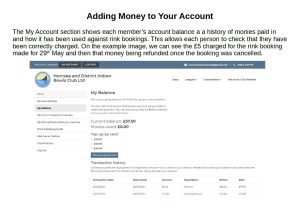
– Check credit balances and recent transactions
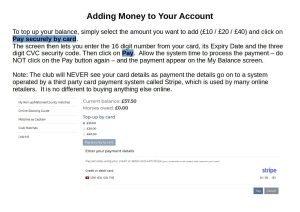
– Top up your Bowlr account with funds to pay for matches and rink time
The following is a simple User Guide to to the most frequently used parts of Bowlr. More help can be found at the Bowlr Online Booking Guide
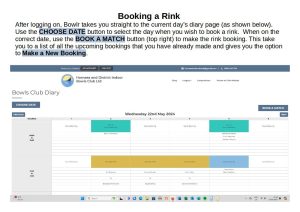
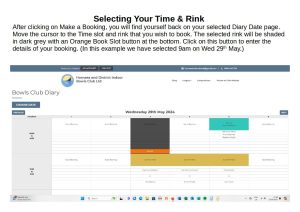
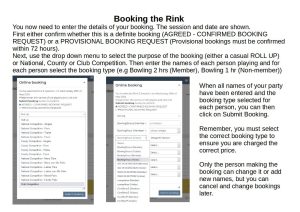
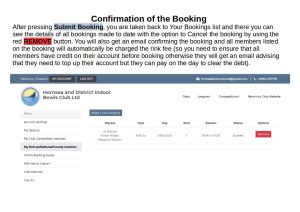
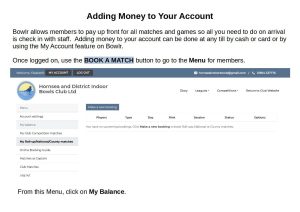
All bookings are immediately charged to your account so you will need to make sure you have funds on your account to avoid getting a warning message from the system. To add money simply follow this guide or pay by card or cash at the reception / till.
Once the rink is booked and paid for, all you need to do is turn up, check in and enjoy your game!